I recently finished an app that returned a huge conversation thread to a user, expecting them to be able to parse through it and understand what it all means.
Points for identifying the information and returning it, but failure for not understanding the problem we are trying to solve with the user, which is providing context and value to what the user is doing, and allowing them to make a decision to move on.
I don’t want to build the summary myself; there are many better, more cost-efficient tools out there, and this seemed like a great opportunity to use Azure Cognitive Services to provide this summary for me.
Azure Cognitive Services (now part of Azure AI Services) are cloud-based, pre-trained AI models and APIs that enable developers to easily add intelligent features—such as vision, speech, language, and decision-making—into applications without needing deep machine learning expertise.
This fits the bill for what I need, as I want to get up and running quickly.
Deploy the Infrastructure
The first thing you need to do is go to Azure and deploy Azure Cognitive Services. You can definitely start with the free tier to test the waters out and see what works for you.
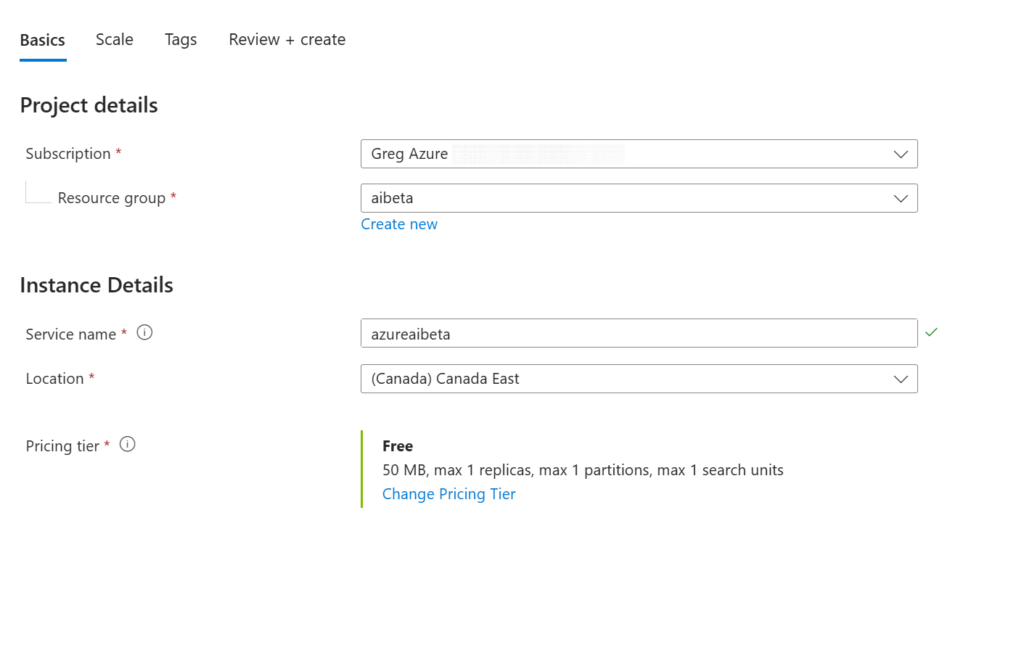
For this walkthrough, I’ll be mainly speaking to the Azure AI and C# capabilities. I will be doing another post on the configuration of our Cognitive Resource later.
Connecting to your Service
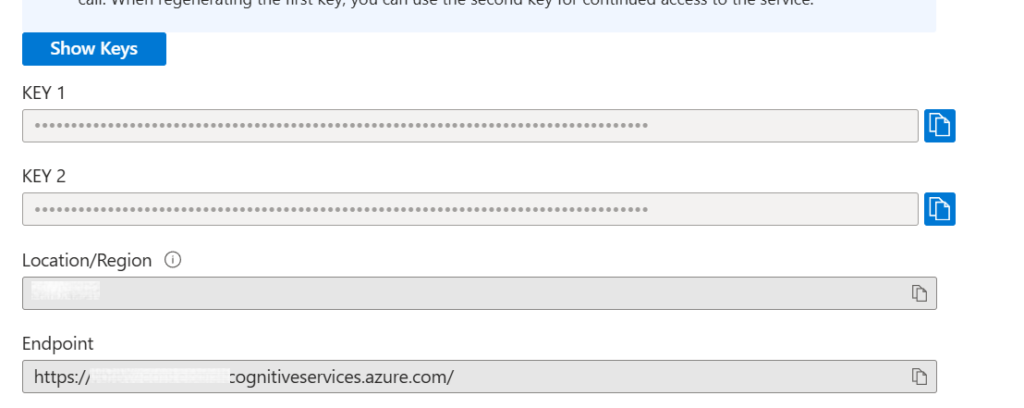
To connect my code to this instance, I’m going to need 2 things – the Key and the Endpoint. With this information, I can send requests to the service to handle.
The Code
The code to get information from Cognitive Services can be broken into 3 parts: the connection, the query, and the result.
The Connection
You will need to install the Azure.AI.TextAnalytics package to be able to run this code. When done, you can start by adding the initial connection initialization logic.
using Azure;
using Azure.AI.TextAnalytics;

var endpoint = new Uri("YOUR_ENDPOINT");
var apiKey = new AzureKeyCredential("YOUR_APIKEY");
var client = new TextAnalyticsClient(endpoint, apiKey);

var text = @"";
At the same time, we need some text for it to analyze. I went to Claude and asked it to generate me a 4 – 5 person email conversation that I wanted to summarize on ecommerce payment providers. You can add this directly into the “text” variable.
The Query
Query might be a bad name, but essentially, we are telling Cognitive Services “what” we want to get out of the summary. To do this, we create a set of actions based on the TextAnalayticsActions class. For our example, I am going to use the AbstractiveSummarizeActions
var actions = new TextAnalyticsActions
{
    AbstractiveSummarizeActions = new[]
    {
        new AbstractiveSummarizeAction { SentenceCount = 1 }
    },
};
Abstractive Summarize Actions uses advanced machine learning to create a concise, human-like summary of a text document as opposed to providing sentences of reference from the text..
Note: There are a number of other actions in this class that I will speak to in future posts that range from the extraction of data, key phrases, entity recognition, Personal Information Entities, and general sentiment.
Calling the code becomes straightforward as you submit your text and actions to the service for it to handle.
var operation = await client.StartAnalyzeActionsAsync(new[] { text }, actions);
await operation.WaitForCompletionAsync();
Accessing the Results
Without sharing with you the complete email thread, here is the summary I got back.
Sarah Aldridge from the company is seeking alignment on a payment provider for an upcoming checkout revamp, moving away from legacy Authorize.Net due to its limitations. The options under consideration are Stripe, Adyen, and Braintree, with a focus on developer experience, international expansion, and cost. Daniel Kowalski highlights Stripe’s superior developer experience and seamless integration with serverless technologies, while Priya Fernandez points out potential cost savings with Adyen above a certain GMV threshold. Marcus Thibault raises concerns about compliance with PCI-DSS and SCA/3DS2, particularly for EU customers, and suggests prioritizing Stripe or re-evaluating with Adyen based on TCO models. The team is leaning towards Stripe for initial integration, with a formal evaluation of Adyen once a GMV milestone is reached, and Braintree is being deprioritized pending SCA compliance confirmation. A meeting is scheduled for Thursday to finalize decisions, with tasks assigned to assess TCO comparisons and integration sprint estimates.
This is all gibberish, but essentially, what Cognitive Services did was take my information and condense it to a few sentences that I could understand and get the gist of what is happening.
As we sent a request to query for an AbstractiveSummary, here we will check the AbstractiveSummarizeResults and then dig into the document results of each page that is returned, outputting the summary to the screen.
    foreach (var actionResult in page.AbstractiveSummarizeResults)
    {
       foreach (var doc in actionResult.DocumentsResults)
        {
            foreach (var summary in doc.Summaries)
                Console.WriteLine($"  {summary.Text}");

        }
    }
There are many other great features to Azure AI Cognitive Services. This is another great way to get started in AI and provide maximum value, with minimal code and effort to your applications.