I’ve been setting up some new environments for a client, and once all set up, realized they all looked completely the same, which is a recipe for someone doing something wrong, somewhere, sometime.
The old theme engine is gone, but there are some caveats with the new engine.
Create your Theme
At its most basic level, all I want is a custom header colour along the top. I’m not keen to get into everything else, so for me, I created a basic theme.
<CustomTheme>
	<AppHeaderColors
	  background="#C42B1C"
	  foreground="#FFFFFF"
	  backgroundHover="#A52518"
	  foregroundHover="#FFFFFF"
	  backgroundPressed="#8A1E13"
	  foregroundPressed="#FFFFFF"
	  backgroundSelected="#6E1810"
	  foregroundSelected="#FFFFFF"
	/>
</CustomTheme>
All other options for Custom Themes are available here – https://learn.microsoft.com/en-us/power-apps/maker/model-driven-apps/modern-theme-overrides.
Although I have to admit, it was fun seeing what Comic Sans looked like in PowerApps
Add in Your Theme
Second, you want to find the setting “Custom theme definition” and add it to a solution. The webresource we just added will be entered into the “Environment Value” field as shown below.
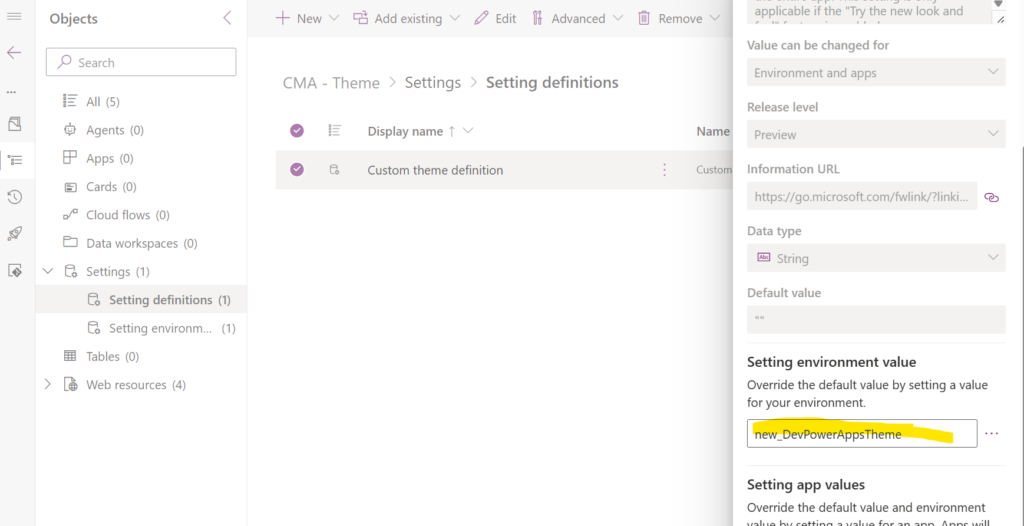
Although called an “Environment Value”, it is not, and you cannot substitute Environment values here.
The “Not So Fun Part”
In my Dev environment, I have unmanaged solutions; in every other environment, I use managed solutions, and if the above custom setting cannot be changed by an environment value, this means I need to get a changed value into each environment. Also, I have a policy in place that has disabled unmanaged customizations in my other environments, so I must send it there in an unmanaged way.
Back to my solution (which just handles Themes), I created my additional themes.
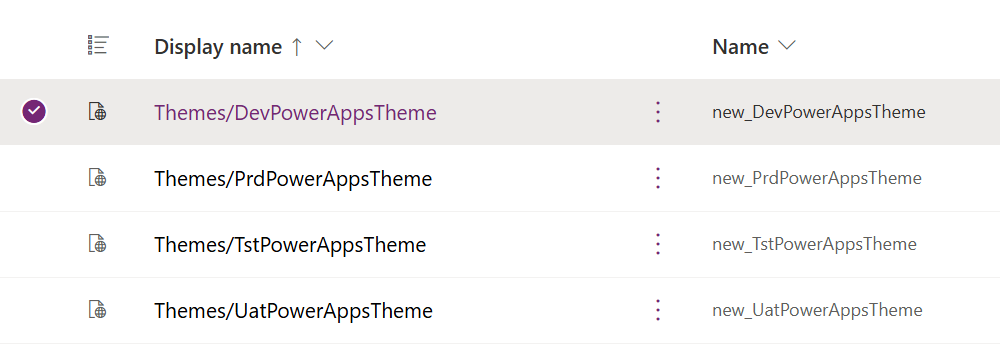
And then came the manual part. To get a clean deployment into each environment, I updated the custom theme definition in each file, published customizations, and exported them as a manual solution. From there, I then imported each version (dev, tst, uat, prd) into each relevant environment.
I would have liked to have autogenerated the solution exports a bit better, but I’ve added the managed inputs to my repos, and it’s not such a problem to update them.